
Introducing KAiZEN eSign Mobile App: Sign Documents Anywhere


We’re excited to announce the KAiZEN eSign Mobile app that brings a new level of simplicity to document signing and management, making it easier, faster and available wherever you work.
As companies keep going beyond desks and desktops, we saw an opportunity to bring a secure and compliant experience to document signing on mobile devices. The KAiZEN eSign Mobile App allows users to send, sign, track and manage documents directly from your smart phone, without any compromise on security or legal validity.
The app brings the same reliability and compliance standards of the KAiZEN eSign platform to a mobile-first experience.
Why We Built the KAiZEN eSign Mobile App
Document workflows shouldn’t pause just because you’re away from your desk. Many professionals, sales teams, HR teams, field agents, and business owners, rely on mobile devices to keep work moving.
The KAiZEN eSign Mobile App was built to,
- Enable faster approvals
- Reduce dependency on paper and desktops
- Support remote and field-based teams
- Maintain compliance with Indian and global eSignature regulations
What You Can Do with the KAiZEN eSign Mobile App
The app offers full support of the eSigning process, from uploading document to signing it.
- Upload and Prepare Documents: Upload your documents from your device, add required fields like signature, initials, dates and text inputs before sending them for signing.
- Sign Documents on the Go: Sign documents on your own or send them out for signature to other people at any time from anywhere. The signatures captured through the app, are legally valid and stored securely.
- Send Documents for Signature: Send documents to one or multiple recipients, define signing order, and manage multi-party signing workflows directly from the app.
- Instant Notifications: Receive timely notifications when action is required, helping you respond faster and keep processes moving.
Security and Compliance You Can Rely On
Security and compliance are central to everything we build at KAiZEN. The mobile app follows the same standards as our web platform.
- End-to-end encryption for documents and signatures
- Tamper-proof audit trails with time stamps and signer details
- Legally binding eSignatures compliant with:
- DSC
- eIDAS
- AATL standards
- GDPR
Each finished document contains a digital certificate of completion which provides proof of authenticity and traceability.
Installing the KAiZEN Mobile App on Android
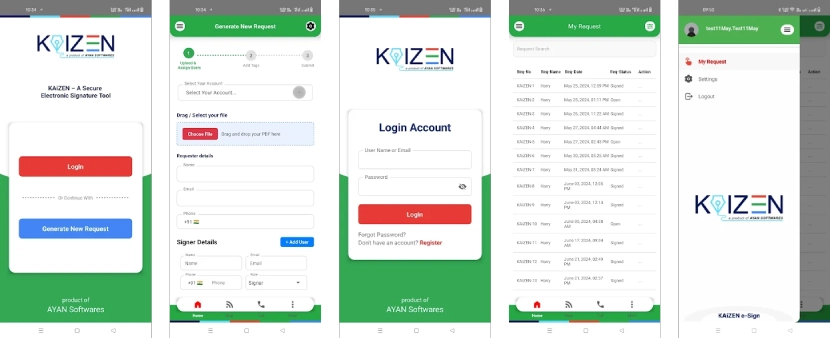
The KAiZEN Mobile App is available for Android devices in the Google Play Store. Users can download and install this with just a few taps by visiting the app listing on Google Play. After the installation is finished, the app may be launched straight away and you can start to use it. From there, users can sign in and start working with their documents, no further configuration needed.
Login in to the KAiZEN Mobile App
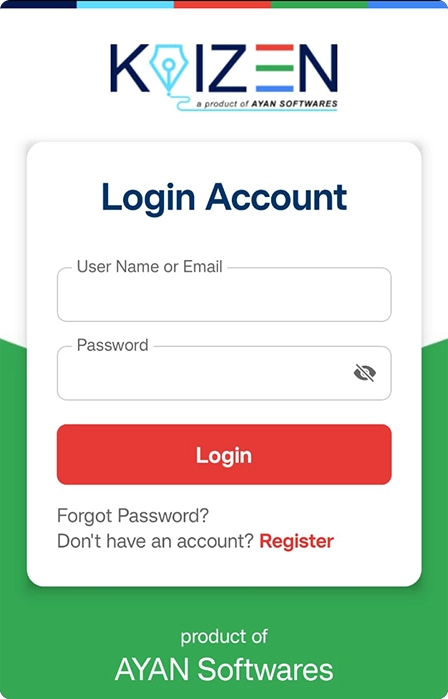
Once you open the KAiZEN Mobile App, you will be asked to sign in.
- If you already have a KAiZEN account just enter your email ID and password and tap on Login.
- If this is your first time using KAiZEN, you may register from the app itself by tapping on the Create Account option and following the on-screen instructions to sign up.
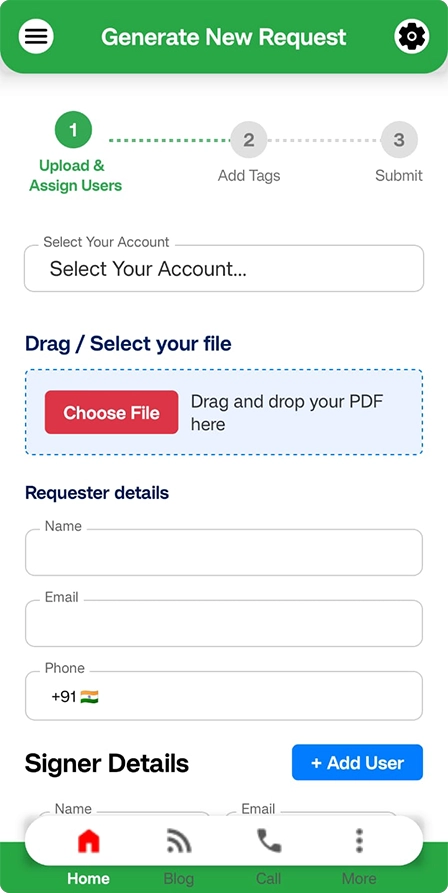
After a successful login, you will be redirected to the Dashboard and you can start to upload, send, sign and track documents.
Conclusion
The KAiZEN Mobile App has been designed to make document signing easy and secure for users who need to work on the go. With the availability of our eSignature platform on Android smartphones, we bring signing workflows of simplicity, compliancy, security and reliability.
We want you to go explore the app and send us your thoughts, it helps us keep making the mobile KAiZEN experience better.
For additional details or support, users can reach out to the KAiZEN support team through the official website.
Sign up for Free
Trial today!
Try KAiZEN for free

We’re excited to announce the KAiZEN eSign Mobile app that brings a new level of simplicity to document signing and management, making it easier, faster and available wherever you work.
As companies keep going beyond desks and desktops, we saw an opportunity to bring a secure and compliant experience to document signing on mobile devices. The KAiZEN eSign Mobile App allows users to send, sign, track and manage documents directly from your smart phone, without any compromise on security or legal validity.
The app brings the same reliability and compliance standards of the KAiZEN eSign platform to a mobile-first experience.
Why We Built the KAiZEN eSign Mobile App
Document workflows shouldn’t pause just because you’re away from your desk. Many professionals, sales teams, HR teams, field agents, and business owners, rely on mobile devices to keep work moving.
The KAiZEN eSign Mobile App was built to,
- Enable faster approvals
- Reduce dependency on paper and desktops
- Support remote and field-based teams
- Maintain compliance with Indian and global eSignature regulations
What You Can Do with the KAiZEN eSign Mobile App
The app offers full support of the eSigning process, from uploading document to signing it.
- Upload and Prepare Documents: Upload your documents from your device, add required fields like signature, initials, dates and text inputs before sending them for signing.
- Sign Documents on the Go: Sign documents on your own or send them out for signature to other people at any time from anywhere. The signatures captured through the app, are legally valid and stored securely.
- Send Documents for Signature: Send documents to one or multiple recipients, define signing order, and manage multi-party signing workflows directly from the app.
- Instant Notifications: Receive timely notifications when action is required, helping you respond faster and keep processes moving.
Security and Compliance You Can Rely On
Security and compliance are central to everything we build at KAiZEN. The mobile app follows the same standards as our web platform.
- End-to-end encryption for documents and signatures
- Tamper-proof audit trails with time stamps and signer details
- Legally binding eSignatures compliant with:
- DSC
- eIDAS
- AATL standards
- GDPR
Each finished document contains a digital certificate of completion which provides proof of authenticity and traceability.
Installing the KAiZEN Mobile App on Android
The KAiZEN Mobile App is available for Android devices in the Google Play Store. Users can download and install this with just a few taps by visiting the app listing on Google Play. After the installation is finished, the app may be launched straight away and you can start to use it. From there, users can sign in and start working with their documents, no further configuration needed.
Login in to the KAiZEN Mobile App
Once you open the KAiZEN Mobile App, you will be asked to sign in.
- If you already have a KAiZEN account just enter your email ID and password and tap on Login.
- If this is your first time using KAiZEN, you may register from the app itself by tapping on the Create Account option and following the on-screen instructions to sign up.
After a successful login, you will be redirected to the Dashboard and you can start to upload, send, sign and track documents.
Conclusion
The KAiZEN Mobile App has been designed to make document signing easy and secure for users who need to work on the go. With the availability of our eSignature platform on Android smartphones, we bring signing workflows of simplicity, compliancy, security and reliability.
We want you to go explore the app and send us your thoughts, it helps us keep making the mobile KAiZEN experience better.
For additional details or support, users can reach out to the KAiZEN support team through the official website.
Sign up for Free
Trial today!
Try KAiZEN for free