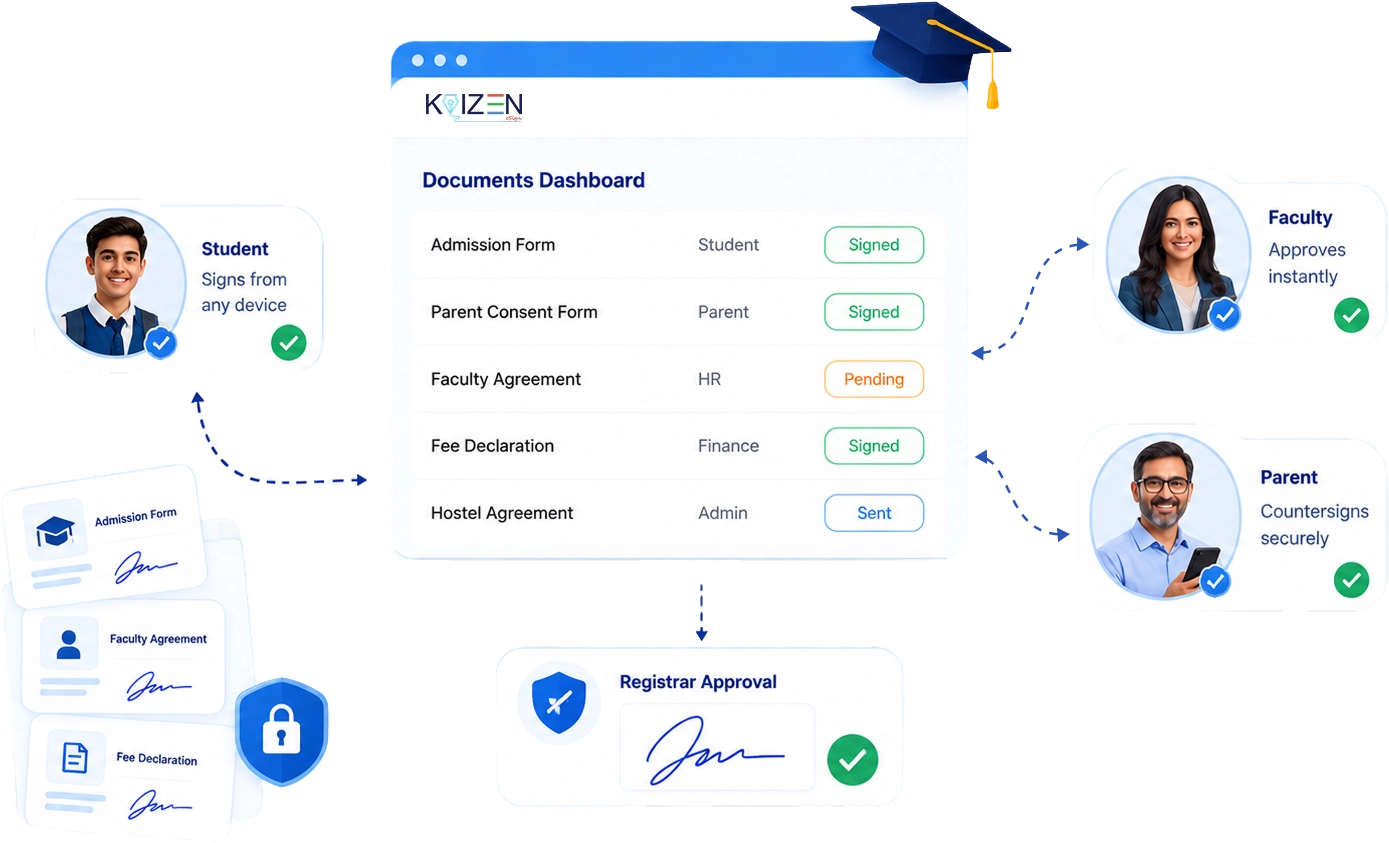
eSignature for Education

Go paperless across every department. Sign admissions forms, faculty agreements, and other documents digitally.

Educational Institutions

Starting Today

Whether you're running admissions, managing faculty, or handling institutional procurement, KAiZEN eSign works across your entire campus.

Admissions & Student Affairs

Admissions & Student Affairs

Get admission forms, fee declarations, hostel agreements, and consent forms signed by students and parents without any of them having to visit campus. Send the link, they sign from their phone, done.

Admissions & Student Affairs

HR & Faculty Management

Issue appointment letters, contract renewals, and policy acknowledgements to teaching and non-teaching staff without printing a single sheet. Get every signature in the right order, on time, without follow-up calls.

Admissions & Student Affairs

Finance & Administration

Procurement approvals, vendor agreements, and grant documents involve multiple departments. Route everything digitally and know exactly where each approval is stuck at any point.

Admissions & Student Affairs

Exam & Academic Administration

Examination forms, research agreements, and affiliation documents require signatures from multiple parties. Handle all of it digitally without chasing department heads across campus.

How it works

1

Upload admission form or consent document

2

Add student and parent as signatories

3

Send signing link via Email, SMS, or WhatsApp

4

Both sign from any device, no account needed

5

Receive signed PDF with full audit trail

Built for the Way Educational Institutions
Actually Work

Multi-Campus Document Management

One Dashboard for Every Department, Every Campus

  • Organise documents by department, campus, academic year, or document type
  • Every staff member only sees documents relevant to their role and department
  • Track the status of every document, sent, viewed, signed, pending, from one screen
  • Pull up any signed document instantly for accreditation, inspection, or audit purposes
  • No more searching through email threads or physical filing cabinets
Student & Parent Signing — No Account Needed

Students and Parents Sign in Seconds — From Any Phone

  • Students and parents sign directly from a WhatsApp or email link, zero sign-up required
  • Works on any smartphone, tablet, or computer, no app download needed
  • Supports multiple signatories on one form, student signs, then parent countersigns, then registrar approves
  • Automatic reminders sent if a form hasn't been signed within the set deadline
  • Every signed form is time-stamped and stored, ready for records or inspections at any point
Institutional Branding & Templates

Every Document Looks Like It Came from Your Institution

  • Add your institution's logo, letterhead colours, and official seal to every document
  • Build reusable templates for admission forms, appointment letters, fee declarations, and more
  • Auto-fill student name, roll number, course, department, and academic year
  • Send the same template to hundreds of students simultaneously with one action
  • Each department maintains its own branded templates, no overlap, no confusion

Sign Every Education Document Digitally

KAiZEN eSign handles every document across the full student and staff lifecycle, from the first admission form to the final experience letter.

Admission Application Form
Offer / Appointment Letter
Admission Application Form
Hostel & Accommodation Agreement
Admission Application Form
Parent & Guardian Consent Form
Admission Application Form
Fee Declaration & Undertaking
Admission Application Form
Scholarship & Financial Aid Agreement
Admission Application Form
Research & Thesis Agreement
Admission Application Form
MOU with Partner Institution
Admission Application Form
Vendor & Procurement Agreement
Admission Application Form
Faculty Performance Review
Admission Application Form
Examination Undertaking Form
Admission Application Form
Leaving Certificate & Experience Letter
Take your Institution Fully Paperless

Take your Institution Fully Paperless Starting Today

Frequently Asked Questions

Absolutely. Signatories receive a secure signing link via email or WhatsApp and can sign from any device, anywhere in the world. This makes it ideal for NRI clients and out-of-city transactions.

There is no limit on the number of signatories. You can set a specific signing order, for example, buyer signs first, then seller, then witness/broker, and each party gets notified automatically when it's their turn.

All parties receive a final, signed PDF with a certificate of completion, full audit trail, and timestamp. The document is also securely stored in your KAiZEN eSign dashboard and can be retrieved any time.

No. Your clients, buyers, sellers, tenants, do not need to sign up for KAiZEN eSign. They simply receive a secure link and sign directly in their browser on any device.

Got a query? We're here 24/7

Scroll to Top