
How to Send Documents for Signature Without Email Back and Forth

Knowing how to send documents for signature to multiple people without losing track of who has signed is one of the most common challenges growing businesses face.
Have you ever needed multiple signatures on a document? If so, you already understand how quickly it can turn into chaos. Send it off to one person, wait while they sign, follow up when they go quiet, lose track of who has actually signed, and end up with three versions floating around in your inbox.
An eSignature workflow offers the solution. Instead of manually overseeing this process, simply upload your document once, add all the people who need to be involved, set who needs to sign or review, establish the order, and track everything from one place.
Quick answer: For multiple signatures, an eSignature platform that supports multiple recipients is your best bet. Upload your document, add recipients with different roles like signer or reviewer, select their order of action, and send. Bulk sending features offer a faster solution when sending one document to many people independently at the same time.
Why Email Does Not Work When You Need to Send Documents for Signature to Multiple People
Email works fine with one signature. But as soon as more than two people become involved, it begins to break down quickly.
Sending out the same document again and again, managing separate threads for each recipient, manually following up when people go silent, and never quite knowing who has signed or who still needs to. Add to that the possibility of someone signing an outdated file version or missing an attachment altogether, and it becomes clear why email cannot scale when you need to send documents for signature at volume.
Imagine sending and tracking 50 NDAs for 50 new employees individually via email. That would consume an entire afternoon just tracking responses manually. Bulk sending and multi-signer workflows were designed precisely for situations like these.
According to McKinsey, businesses that automate document workflows report significant reductions in time spent on administrative tasks like chasing signatures manually.
Two Different Ways to Send Documents for Signature
There are two separate problems here and they are solved in different ways. Knowing which one you actually need changes how you set it up when you send documents for signature.
- Bulk document sending involves one document being distributed to many recipients independently. For example, HR sending 50 employee NDAs where each person receives their own copy and signs independently without waiting on anyone else.
- Multiple-signer workflows involve one document that needs to be reviewed or signed by multiple people, often in a set order. For example, HR reviews it first, a manager approves it, and an employee signs it last.
How to Send Documents for Signature in Bulk
If you need to send the same document to multiple recipients independently, KAiZEN eSign lets you send bulk signature requests in just a few simple steps:
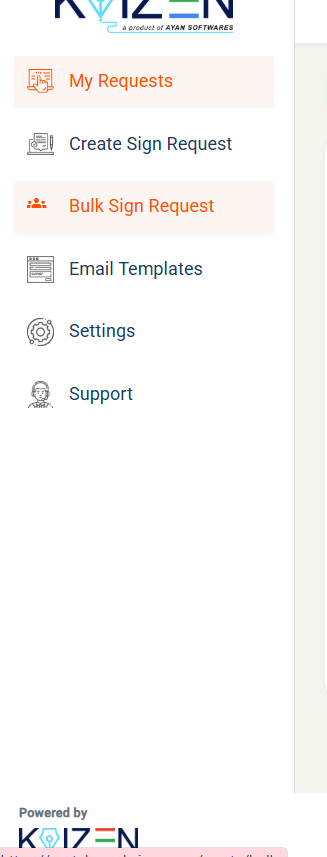
- Step 1: Open the KAiZEN eSign portal and select Bulk Sign Request from the sidebar.
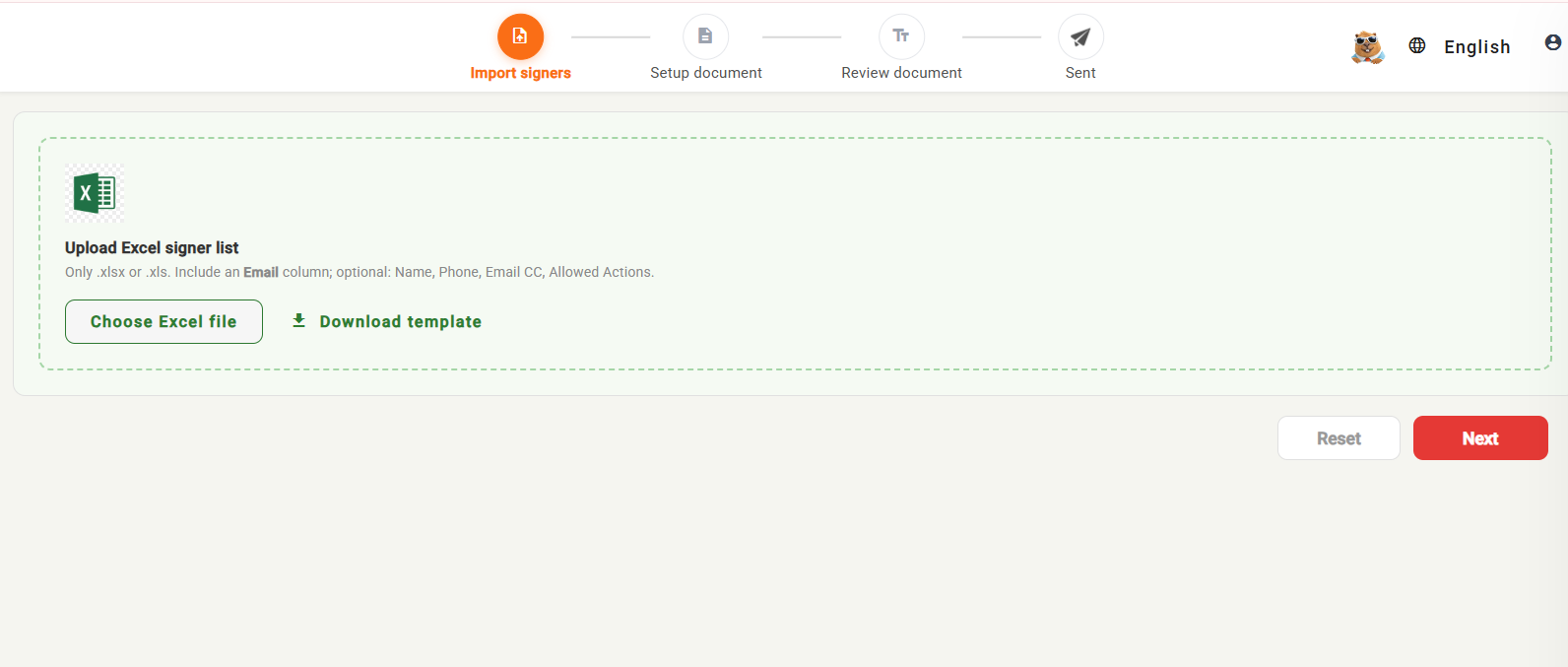
- Step 2: Choose your Excel file containing the recipients’ names and email addresses. You can also include phone numbers for WhatsApp delivery if required.
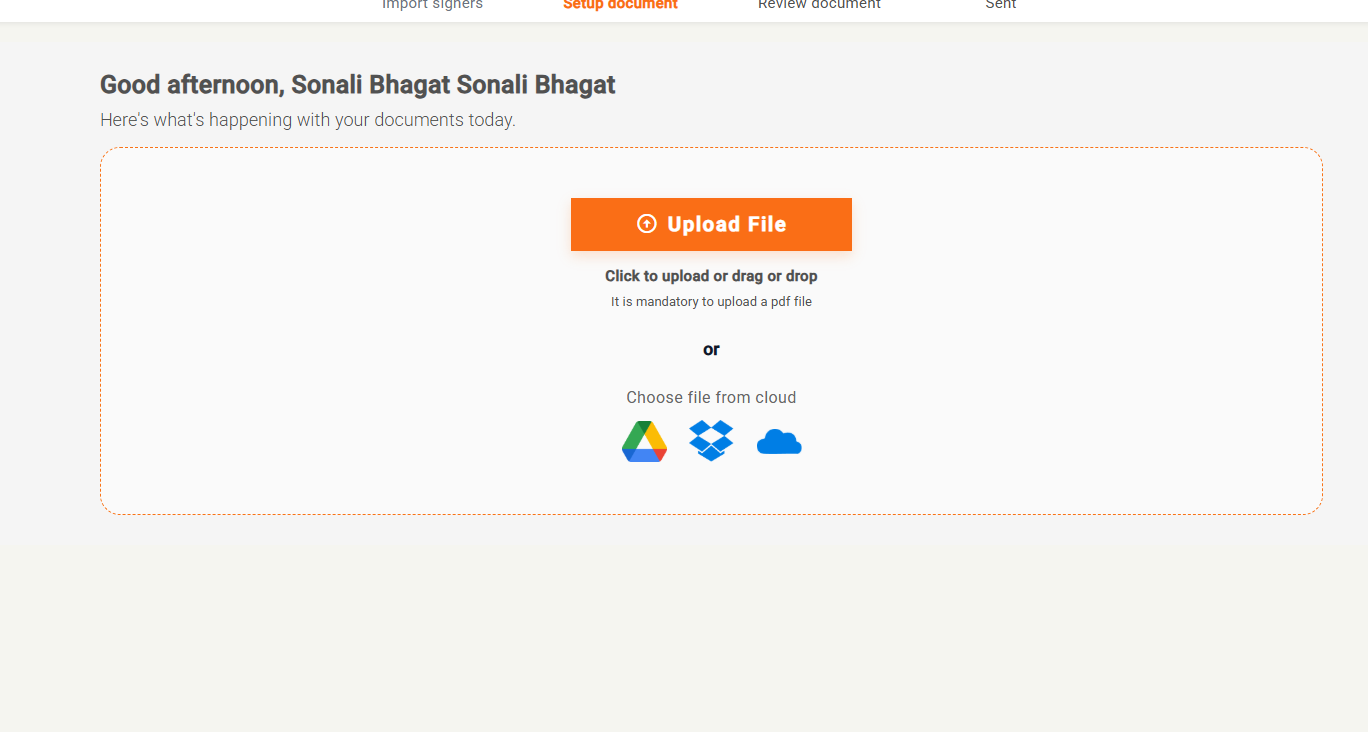
- Step 3: Attach the document you want the recipients to sign and submit the bulk sign request.
- Step 4: submit the document

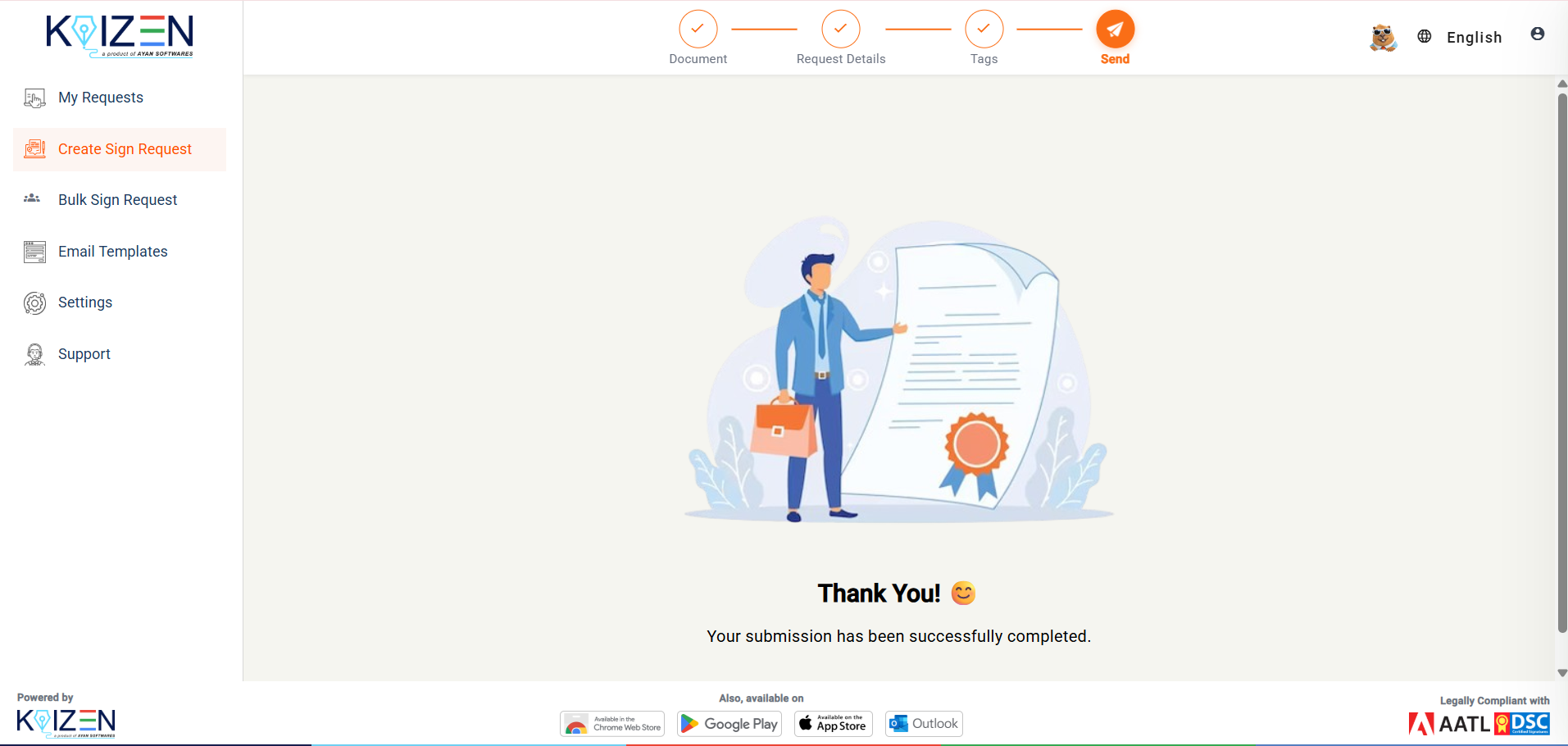
Once submitted, KAiZEN eSign processes the request and sends the document to each recipient individually for signing. This makes it easier for HR teams, businesses, and other organizations to collect signatures from multiple people without creating separate requests manually.
How to Send Documents for Signature Through a Signing Hierarchy
In this case, instead of sending several copies of one document, it requires multiple people to interact with it in an organized fashion. This is where a signing hierarchy comes into play when you send documents for signature through multiple people.
What Is a Signing Hierarchy?
A signing hierarchy refers to the order in which recipients of a document receive and act upon it. Person 2 only gets it once Person 1 has fulfilled their obligation, whether that is signing, reviewing, or approving. This becomes important when documents need to go through an approval chain rather than landing in everyone’s inbox simultaneously.
Who Should Sign and Who Should Review?
Not every participant needs to sign a document. Some just need to see and approve it before it goes further. When you send documents for signature using KAiZEN eSign, you can assign different roles to different recipients:
| Person | Role |
|---|---|
| HR Manager | Reviewer |
| Department Head | Reviewer |
| Director | Signer |
| Employee | Signer |
Setting this up correctly ensures documents reach the correct people at the appropriate stages rather than arriving all at once and forcing recipients to sort out the order themselves.
How to Send Documents for Signature with Multiple People Using KAiZEN eSign
Here is the full process to send documents for signature to multiple people with KAiZEN eSign:
- Step 1: Open the KAiZEN eSign portal and select Create Sign Request.
- Step 2: Select Send Document for Signature to start the signing process.
- Step 3: Upload the document that needs to be signed.
- Step 4: Manage the users by entering their name, email address, and phone number (optional). Then, select the appropriate role for each user.
- Step 5: Review the details and submit the document to send the signature request to the recipients.

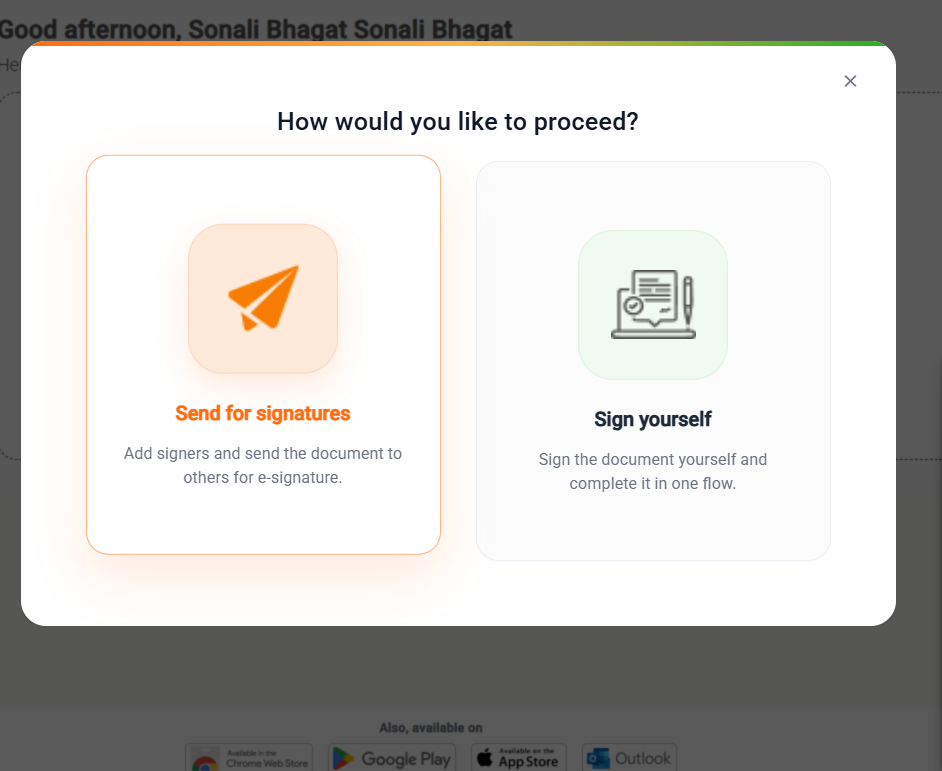
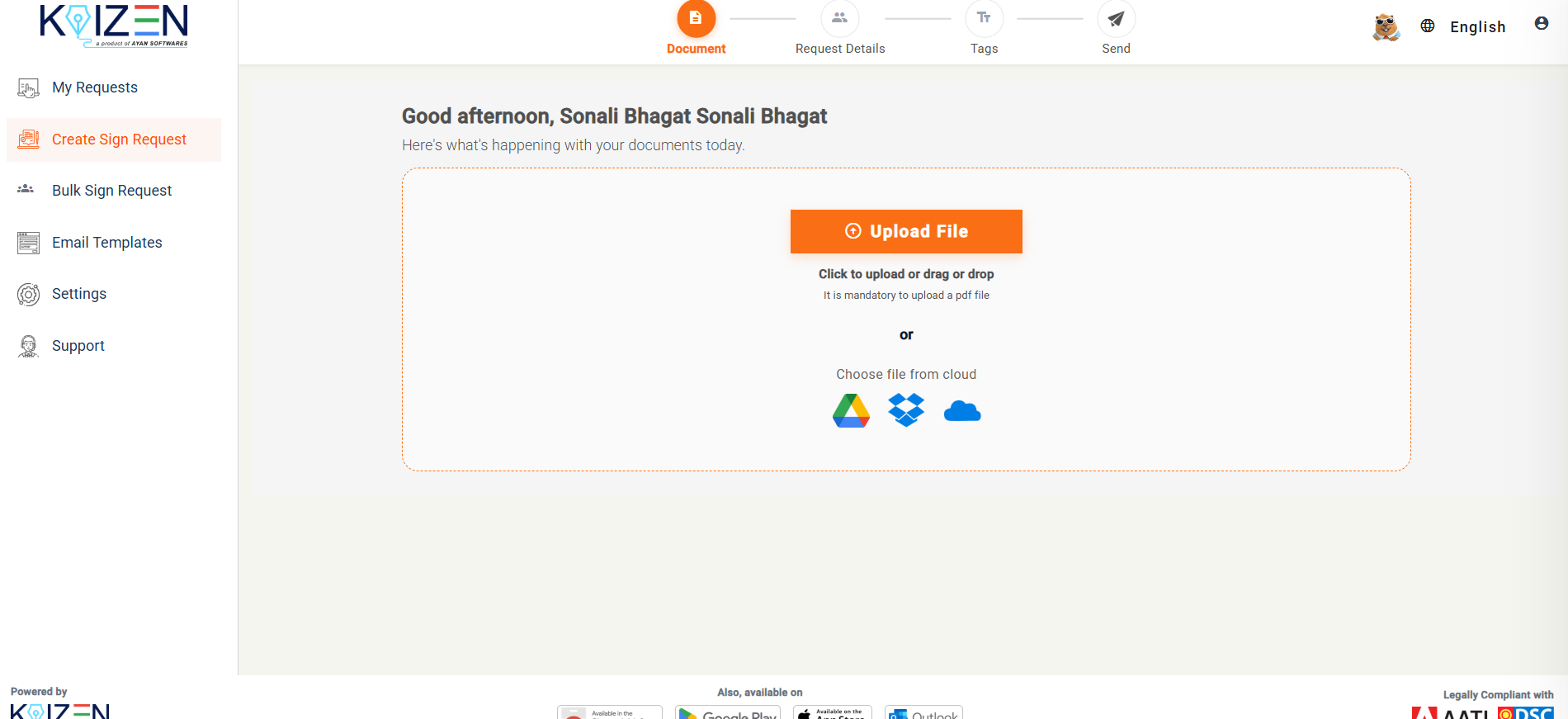
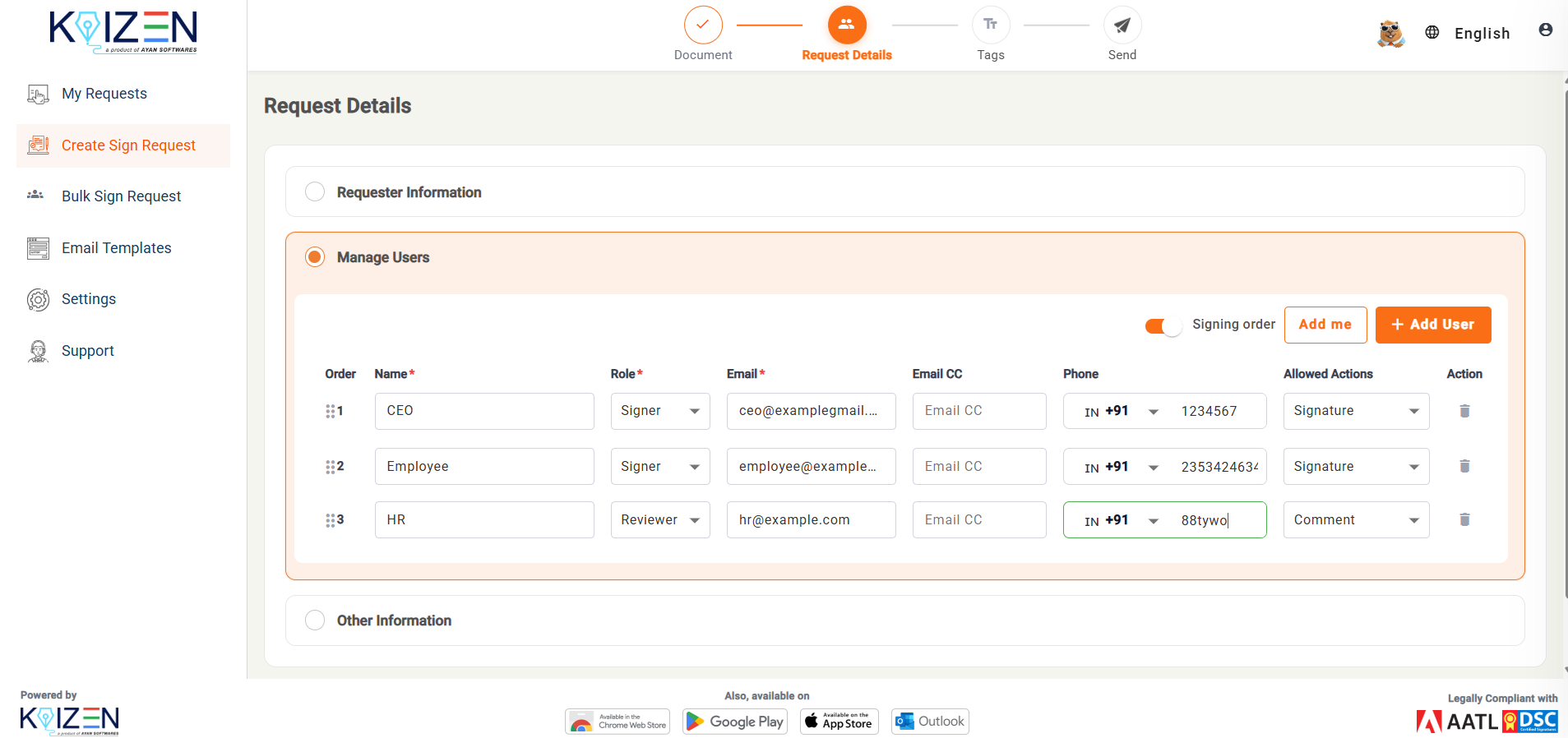
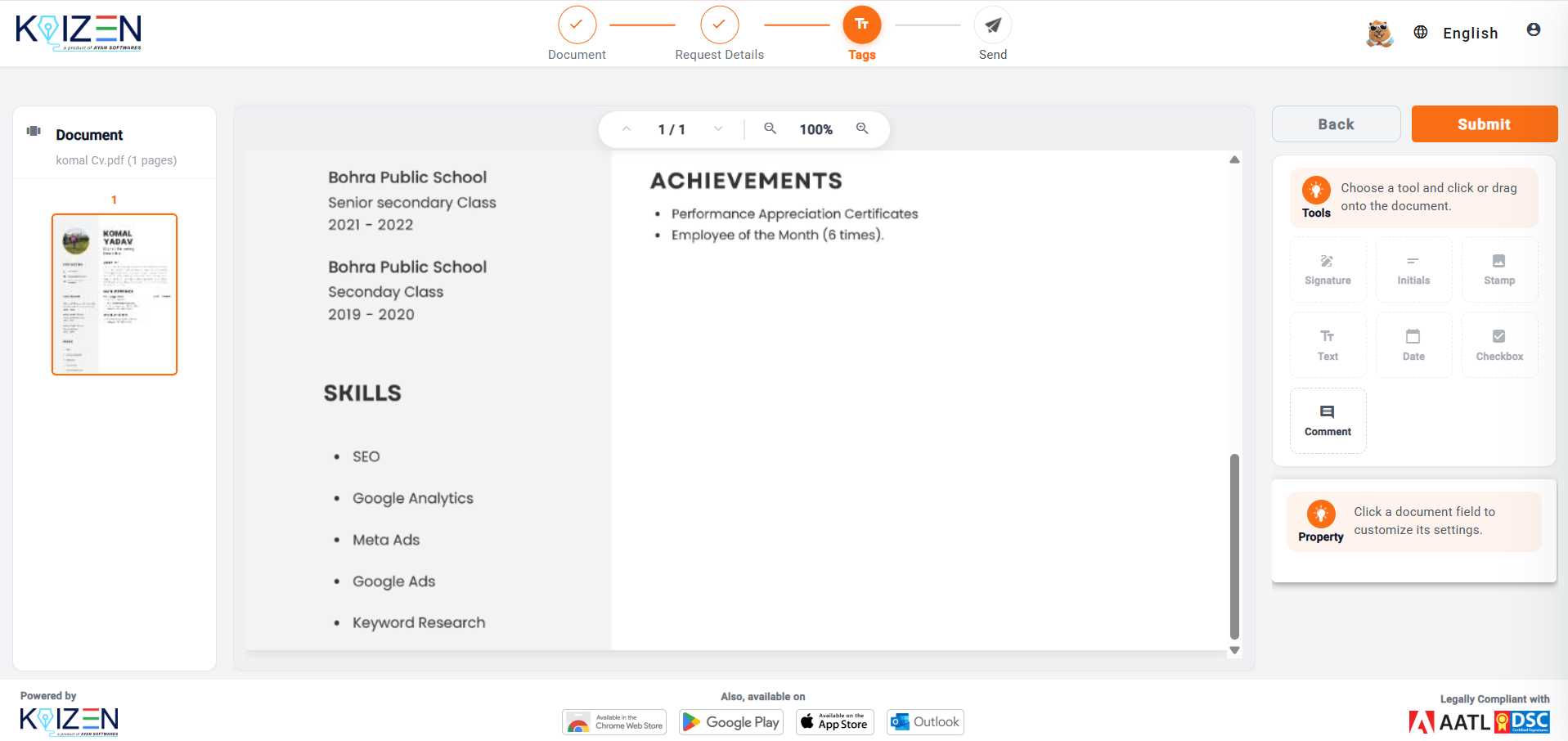
Once submitted, KAiZEN eSign sends the document to the selected recipients based on the details and roles you have provided, making it easier to manage signatures from multiple people in one workflow.
Bulk Sending vs Multiple-Signer Workflow — Which Should You Use to Send Documents for Signature?
| Feature | Bulk Sending | Multiple-Signer Workflow |
|---|---|---|
| Main purpose | Deliver one document to many recipients independently | Get multiple people to act on one document in sequence |
| Example | NDA sent to 100 employees, each signing their own copy | A contract signed by 3 people in a set order |
| Recipient list | Imported directly via Excel | Added directly into the workflow |
| Signing order | Not needed — recipients act independently | Can be defined step by step |
| Roles | Typically similar for everyone | Separate signer and reviewer roles as needed |
| Best for | HR documentation and mass distribution | Contracts, approvals, and multi-party agreements |
Who Needs to Send Documents for Signature to Multiple People?
The need to send documents for signature efficiently applies across many industries and teams:
- HR teams frequently send NDAs, employee policies, offer documents, and acknowledgement forms out to multiple recipients at once
- Finance and accounting teams use multi-signer workflows for client agreements, approval documents, or engagement letters requiring sign-off from multiple individuals
- Real estate teams handle buyer and seller contracts, property documentation, and broker agreements that require multiple signatures in a specified order
- Sales teams send customer contracts and proposals that need internal approval before reaching customers
- Legal teams handle contracts and multi-party agreements that usually involve more than one signatory
Learn more about how eSignatures work for Indian businesses across all these industries and why more teams are switching away from email-based document workflows.
Can You Send Documents for Signature via WhatsApp?
With KAiZEN eSign, yes. Documents can be delivered both through WhatsApp and email when you send documents for signature. If a recipient is more likely to respond faster through WhatsApp than email, this can shorten how long a document remains unsigned. It is not a replacement channel but an additional option that may be more convenient for certain recipients.
Read our full guide on how to send documents for signature on WhatsApp to understand how this works in practice.
Email vs eSignature Workflow — Which Is Better to Send Documents for Signature?
| Task | Traditional Email | eSignature Workflow |
|---|---|---|
| Add recipients | Manual, one at a time | Centralized |
| Assign signer | Manual | Built into the workflow |
| Assign reviewer | Manual | Supported as a distinct role |
| Set signing order | Difficult to enforce | Configurable |
| Track status | Manual | Centralized |
| Send reminders | Manual | Automated |
| Final document | Manually collected and stored | Completed and stored through the workflow |
Is It Safe to Send Documents for Signature Online?
Security depends on your platform of choice, but most eSignature tools are built with security in mind. When you send documents for signature through KAiZEN eSign, the security measures include:
- Authentication to confirm who is signing
- Encryption in transit and at rest
- Access controls limiting who can view or act upon a document
- Audit trails tracking every action taken
- Tamper-evident records once a document is completed
KAiZEN eSign is certified with ISO 27001 and SOC 2 Type II for enterprise-grade security. Every document sent through the platform is legally valid under the IT Act 2000 in India. Learn more about whether an electronic signature is legally binding for your specific situation.
Is It Safe to Send Documents for Signature Online?
Security depends on your platform of choice, but most eSignature tools are built with security in mind. When you send documents for signature through KAiZEN eSign, the security measures include:
- Authentication to confirm who is signing
- Encryption in transit and at rest
- Access controls limiting who can view or act upon a document
- Audit trails tracking every action taken
- Tamper-evident records once a document is completed
KAiZEN eSign is certified with ISO 27001 and SOC 2 Type II for enterprise-grade security. Every document sent through the platform is legally valid under the IT Act 2000 in India. Learn more about whether an electronic signature is legally binding for your specific situation.
Conclusion
Sending documents for signature to multiple people does not need to involve managing multiple email threads and tracking people individually. Bulk sending is an efficient solution when the same document needs to go out to many people at the same time, while for documents requiring signatures in sequence, an established signing hierarchy keeps everything running in its proper order.
KAiZEN eSign offers both solutions. Bulk sending via Excel-based recipient import and configurable signing hierarchies with distinct signer and reviewer roles to keep documents moving through an orderly process. Documents can be delivered over email or WhatsApp, keeping everything visible in one place rather than scattered across various inboxes.
Read our full guide on eSignature pricing to understand what it costs to send documents for signature at any volume.
Ready to try it? Start with your first 10 eSigns completely free at ayankaizen.com. No credit card required.
Frequently Asked Questions
Upload the document to an eSignature platform, add each recipient as a signer or reviewer, set their order of action if needed, and send. Alternatively, for sending to multiple recipients independently at once, use bulk sending instead.
Yes. Many eSignature platforms allow multiple signers to act on one document simultaneously or sequentially, depending on how the workflow is designed.
Add each signer, assign their role, and set an ordering mechanism if the document needs to pass through several people before reaching its final destination.
Yes — this practice is called bulk sending. When uploading a recipient list (often via Excel), the document goes out as individual copies to everyone on that list.
A signing hierarchy refers to the order in which document recipients receive and act upon it. Each recipient only gets their copy once everyone ahead of them has fulfilled their part.
A signer needs to officially sign the document, while a reviewer simply reviews and approves its content — useful for approval chains where not everyone needs to act as a legal signatory.
Yes, using a bulk-sending feature that lets you upload a recipient list alongside the document, rather than creating individual signing requests one at a time.
Yes, most eSignature platforms, including KAiZEN eSign, allow users to import recipient lists directly from Excel for efficient mass sending — saving time and effort when sending to large groups.
With KAiZEN eSign, yes. Documents can be delivered both by WhatsApp and email — this option can help when a recipient responds faster via WhatsApp than through traditional email.
Bulk sending involves sending one document out independently to multiple people. A multiple-signature workflow involves several people acting together on one document, in a specific order.
Sign up for Free
Trial today!
Try KAiZEN for free

Knowing how to send documents for signature to multiple people without losing track of who has signed is one of the most common challenges growing businesses face.
Have you ever needed multiple signatures on a document? If so, you already understand how quickly it can turn into chaos. Send it off to one person, wait while they sign, follow up when they go quiet, lose track of who has actually signed, and end up with three versions floating around in your inbox.
An eSignature workflow offers the solution. Instead of manually overseeing this process, simply upload your document once, add all the people who need to be involved, set who needs to sign or review, establish the order, and track everything from one place.
Quick answer: For multiple signatures, an eSignature platform that supports multiple recipients is your best bet. Upload your document, add recipients with different roles like signer or reviewer, select their order of action, and send. Bulk sending features offer a faster solution when sending one document to many people independently at the same time.
Why Email Does Not Work When You Need to Send Documents for Signature to Multiple People
Email works fine with one signature. But as soon as more than two people become involved, it begins to break down quickly.
Sending out the same document again and again, managing separate threads for each recipient, manually following up when people go silent, and never quite knowing who has signed or who still needs to. Add to that the possibility of someone signing an outdated file version or missing an attachment altogether, and it becomes clear why email cannot scale when you need to send documents for signature at volume.
Imagine sending and tracking 50 NDAs for 50 new employees individually via email. That would consume an entire afternoon just tracking responses manually. Bulk sending and multi-signer workflows were designed precisely for situations like these.
According to McKinsey, businesses that automate document workflows report significant reductions in time spent on administrative tasks like chasing signatures manually.
Two Different Ways to Send Documents for Signature
There are two separate problems here and they are solved in different ways. Knowing which one you actually need changes how you set it up when you send documents for signature.
- Bulk document sending involves one document being distributed to many recipients independently. For example, HR sending 50 employee NDAs where each person receives their own copy and signs independently without waiting on anyone else.
- Multiple-signer workflows involve one document that needs to be reviewed or signed by multiple people, often in a set order. For example, HR reviews it first, a manager approves it, and an employee signs it last.
How to Send Documents for Signature in Bulk
If you need to send the same document to multiple recipients independently, KAiZEN eSign lets you send bulk signature requests in just a few simple steps:
- Step 1: Open the KAiZEN eSign portal and select Bulk Sign Request from the sidebar.
- Step 2: Choose your Excel file containing the recipients’ names and email addresses. You can also include phone numbers for WhatsApp delivery if required.
- Step 3: Attach the document you want the recipients to sign and submit the bulk sign request.
- Step 4: submit the document
Once submitted, KAiZEN eSign processes the request and sends the document to each recipient individually for signing. This makes it easier for HR teams, businesses, and other organizations to collect signatures from multiple people without creating separate requests manually.
How to Send Documents for Signature Through a Signing Hierarchy
In this case, instead of sending several copies of one document, it requires multiple people to interact with it in an organized fashion. This is where a signing hierarchy comes into play when you send documents for signature through multiple people.
What Is a Signing Hierarchy?
A signing hierarchy refers to the order in which recipients of a document receive and act upon it. Person 2 only gets it once Person 1 has fulfilled their obligation, whether that is signing, reviewing, or approving. This becomes important when documents need to go through an approval chain rather than landing in everyone’s inbox simultaneously.
Who Should Sign and Who Should Review?
Not every participant needs to sign a document. Some just need to see and approve it before it goes further. When you send documents for signature using KAiZEN eSign, you can assign different roles to different recipients:
| Person | Role |
|---|---|
| HR Manager | Reviewer |
| Department Head | Reviewer |
| Director | Signer |
| Employee | Signer |
Setting this up correctly ensures documents reach the correct people at the appropriate stages rather than arriving all at once and forcing recipients to sort out the order themselves.
How to Send Documents for Signature with Multiple People Using KAiZEN eSign
Here is the full process to send documents for signature to multiple people with KAiZEN eSign:
- Step 1: Open the KAiZEN eSign portal and select Create Sign Request.
- Step 2: Select Send Document for Signature to start the signing process.
- Step 3: Upload the document that needs to be signed.
- Step 4: Manage the users by entering their name, email address, and phone number (optional). Then, select the appropriate role for each user.
- Step 5: Review the details and submit the document to send the signature request to the recipients.
Once submitted, KAiZEN eSign sends the document to the selected recipients based on the details and roles you have provided, making it easier to manage signatures from multiple people in one workflow.
Bulk Sending vs Multiple-Signer Workflow — Which Should You Use to Send Documents for Signature?
| Feature | Bulk Sending | Multiple-Signer Workflow |
|---|---|---|
| Main purpose | Deliver one document to many recipients independently | Get multiple people to act on one document in sequence |
| Example | NDA sent to 100 employees, each signing their own copy | A contract signed by 3 people in a set order |
| Recipient list | Imported directly via Excel | Added directly into the workflow |
| Signing order | Not needed — recipients act independently | Can be defined step by step |
| Roles | Typically similar for everyone | Separate signer and reviewer roles as needed |
| Best for | HR documentation and mass distribution | Contracts, approvals, and multi-party agreements |
Who Needs to Send Documents for Signature to Multiple People?
The need to send documents for signature efficiently applies across many industries and teams:
- HR teams frequently send NDAs, employee policies, offer documents, and acknowledgement forms out to multiple recipients at once
- Finance and accounting teams use multi-signer workflows for client agreements, approval documents, or engagement letters requiring sign-off from multiple individuals
- Real estate teams handle buyer and seller contracts, property documentation, and broker agreements that require multiple signatures in a specified order
- Sales teams send customer contracts and proposals that need internal approval before reaching customers
- Legal teams handle contracts and multi-party agreements that usually involve more than one signatory
Learn more about how eSignatures work for Indian businesses across all these industries and why more teams are switching away from email-based document workflows.
Can You Send Documents for Signature via WhatsApp?
With KAiZEN eSign, yes. Documents can be delivered both through WhatsApp and email when you send documents for signature. If a recipient is more likely to respond faster through WhatsApp than email, this can shorten how long a document remains unsigned. It is not a replacement channel but an additional option that may be more convenient for certain recipients.
Read our full guide on how to send documents for signature on WhatsApp to understand how this works in practice.
Email vs eSignature Workflow — Which Is Better to Send Documents for Signature?
| Task | Traditional Email | eSignature Workflow |
|---|---|---|
| Add recipients | Manual, one at a time | Centralized |
| Assign signer | Manual | Built into the workflow |
| Assign reviewer | Manual | Supported as a distinct role |
| Set signing order | Difficult to enforce | Configurable |
| Track status | Manual | Centralized |
| Send reminders | Manual | Automated |
| Final document | Manually collected and stored | Completed and stored through the workflow |
Is It Safe to Send Documents for Signature Online?
Security depends on your platform of choice, but most eSignature tools are built with security in mind. When you send documents for signature through KAiZEN eSign, the security measures include:
- Authentication to confirm who is signing
- Encryption in transit and at rest
- Access controls limiting who can view or act upon a document
- Audit trails tracking every action taken
- Tamper-evident records once a document is completed
KAiZEN eSign is certified with ISO 27001 and SOC 2 Type II for enterprise-grade security. Every document sent through the platform is legally valid under the IT Act 2000 in India. Learn more about whether an electronic signature is legally binding for your specific situation.
Is It Safe to Send Documents for Signature Online?
Security depends on your platform of choice, but most eSignature tools are built with security in mind. When you send documents for signature through KAiZEN eSign, the security measures include:
- Authentication to confirm who is signing
- Encryption in transit and at rest
- Access controls limiting who can view or act upon a document
- Audit trails tracking every action taken
- Tamper-evident records once a document is completed
KAiZEN eSign is certified with ISO 27001 and SOC 2 Type II for enterprise-grade security. Every document sent through the platform is legally valid under the IT Act 2000 in India. Learn more about whether an electronic signature is legally binding for your specific situation.
Conclusion
Sending documents for signature to multiple people does not need to involve managing multiple email threads and tracking people individually. Bulk sending is an efficient solution when the same document needs to go out to many people at the same time, while for documents requiring signatures in sequence, an established signing hierarchy keeps everything running in its proper order.
KAiZEN eSign offers both solutions. Bulk sending via Excel-based recipient import and configurable signing hierarchies with distinct signer and reviewer roles to keep documents moving through an orderly process. Documents can be delivered over email or WhatsApp, keeping everything visible in one place rather than scattered across various inboxes.
Read our full guide on eSignature pricing to understand what it costs to send documents for signature at any volume.
Ready to try it? Start with your first 10 eSigns completely free at ayankaizen.com. No credit card required.
Frequently Asked Questions
Upload the document to an eSignature platform, add each recipient as a signer or reviewer, set their order of action if needed, and send. Alternatively, for sending to multiple recipients independently at once, use bulk sending instead.
Yes. Many eSignature platforms allow multiple signers to act on one document simultaneously or sequentially, depending on how the workflow is designed.
Add each signer, assign their role, and set an ordering mechanism if the document needs to pass through several people before reaching its final destination.
Yes — this practice is called bulk sending. When uploading a recipient list (often via Excel), the document goes out as individual copies to everyone on that list.
A signing hierarchy refers to the order in which document recipients receive and act upon it. Each recipient only gets their copy once everyone ahead of them has fulfilled their part.
A signer needs to officially sign the document, while a reviewer simply reviews and approves its content — useful for approval chains where not everyone needs to act as a legal signatory.
Yes, using a bulk-sending feature that lets you upload a recipient list alongside the document, rather than creating individual signing requests one at a time.
Yes, most eSignature platforms, including KAiZEN eSign, allow users to import recipient lists directly from Excel for efficient mass sending — saving time and effort when sending to large groups.
With KAiZEN eSign, yes. Documents can be delivered both by WhatsApp and email — this option can help when a recipient responds faster via WhatsApp than through traditional email.
Bulk sending involves sending one document out independently to multiple people. A multiple-signature workflow involves several people acting together on one document, in a specific order.
Sign up for Free
Trial today!
Try KAiZEN for free