
How to Send Documents for Signature on WhatsApp with KAiZEN?
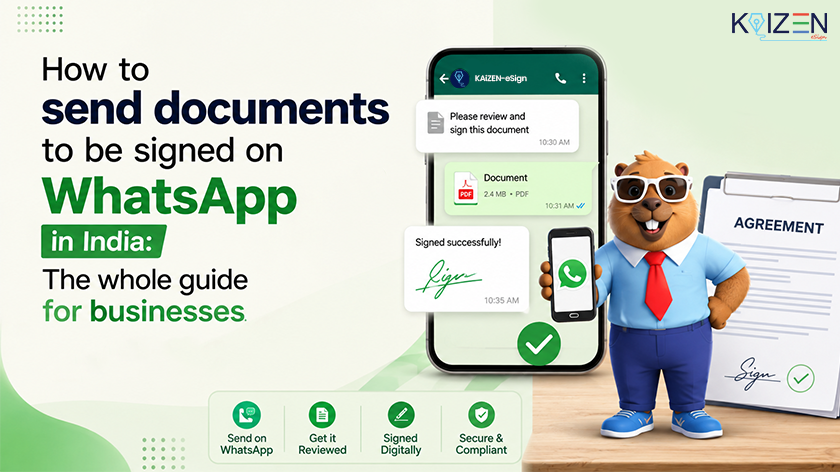

TL;DR: Want to send documents for signature on WhatsApp?
You can send documents for signature on WhatsApp using an eSignature platform like KAiZEN eSign. Upload the document, add the signer’s WhatsApp number and send. The signer opens a secure link and signs in their browser, with no app or account needed, and both sides get a signed copy with an audit trail.
Waiting days for someone to open an email, print a contract, sign it, scan it and send it back is a common source of delay. WhatsApp shortens that gap. India is WhatsApp’s largest market, with more than 500 million users, so most of your clients, vendors and employees already have it open. This guide covers how to send a signature request on WhatsApp, whether it is secure, and when it is legally valid.
Is It Possible to Get Documents Signed on WhatsApp?
Yes, using an eSignature platform. You upload the document, and the platform creates a secure signing link and sends it to the signer’s WhatsApp number. The signer taps the link, reviews the document in their browser and signs it.
This is not the same as attaching a PDF to a chat and asking someone to sign it by hand. With an eSignature platform, the signing happens on a secure page, and every action is recorded.
How WhatsApp eSigning Works, from Upload to Signed Copy
- Upload your document (contract, offer letter, agreement or invoice) to the eSign platform
- The platform creates a unique, secure signing link
- You send that link to the signer’s WhatsApp number
- The signer opens the link, reviews the document and signs it
- You are notified instantly, and both parties receive a signed copy with a full audit trail
There are no attachments bouncing between inboxes and no “did you get my email?” follow-ups. Requests often move faster because signers see them straight away.
How to Send a Signature Request on WhatsApp
Here is the complete step by step process to send documents for signature on WhatsApp with KAiZEN eSign:
-
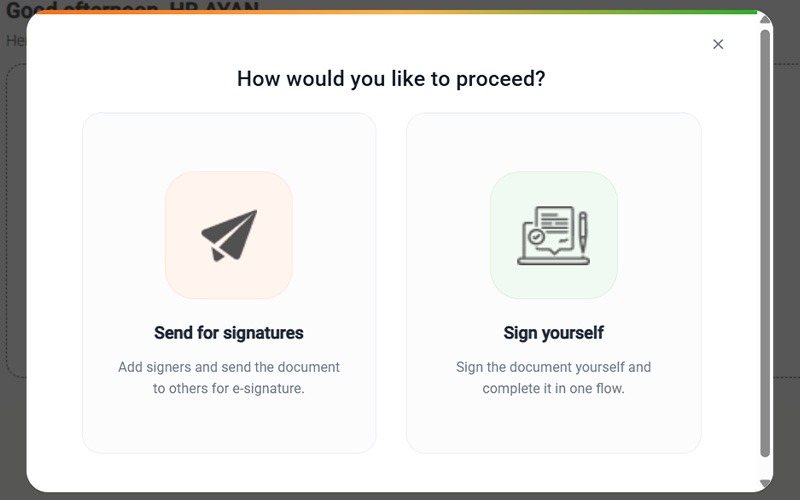
- Step 1: Upload your document on your eSignature platform
-
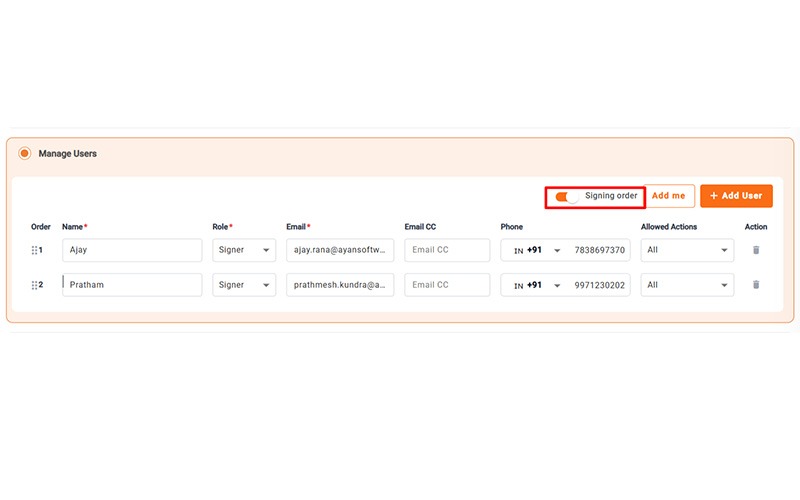
- Step 2: Add the receiver’s name and WhatsApp number

-
- Step 3: If more than one person must sign, set the order of signing
-
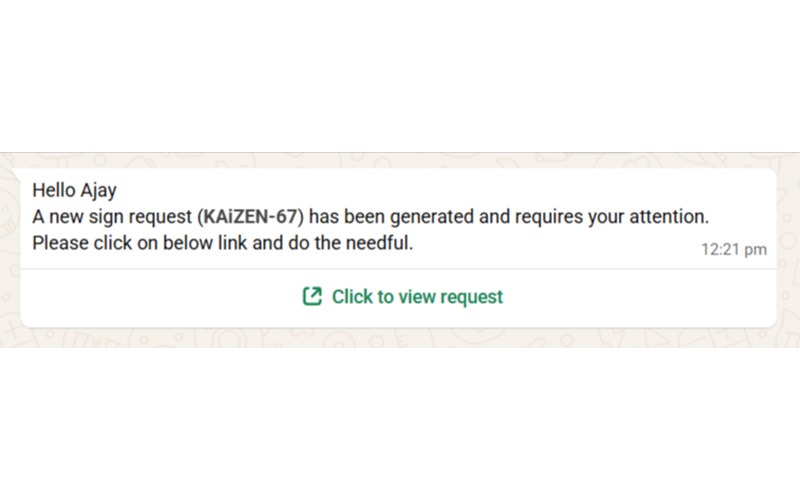
- Step 4: Send — the platform will send the signing link directly to WhatsApp
Which Documents Can You Send?
When you send documents for signature on WhatsApp, you can use it for almost any document that you would normally sign with a handwritten or email signature.
- Contracts and agreements
- Job offer letters
- Lease and rental agreements
- Sales agreements
- Vendor contracts
- Customer authorization forms
- NDAs and proposals
- Invoices
If you would normally print a document, sign it, and scan it back, it is a strong candidate for sending documents for signature on WhatsApp instead.
What the Signer Sees?
There are no special requirements for the recipient when you send documents for signature on WhatsApp. They click the link, it opens in their mobile or desktop browser, they read the document, and sign with their finger, mouse, or typed signature depending on the platform.
Does the Recipient Need to Download an App?
No. This is one of the biggest reasons why sending documents for signature on WhatsApp has gained so much traction. The recipient never needs to download an app or create an account. All they need is WhatsApp, which they probably already have open.
How Secure Is Signing on WhatsApp?
WhatsApp only delivers the link. The protection for your document comes from the signing platform behind it. A secure setup typically includes:
- A unique signing link for each recipient
- Identity verification, such as OTP or email verification
- A timestamped audit trail showing who signed and when
- Tamper evidence if the document changes after signing
WhatsApp encrypts messages in transit (see WhatsApp’s security page), but that is separate from the platform’s own safeguards. For anything that needs a signature record, avoid sending a plain PDF attachment.
Is Signing on WhatsApp Legally Valid in India?
The delivery channel doesn’t decide validity. The signature method does.
- Contracts formed electronically. Under Section 10A of the IT Act, a contract is not unenforceable solely because it was formed electronically, as summarised by Mondaq.
- Electronic signatures. Section 5 gives legal recognition to electronic signatures. Under Section 3A, a signature qualifies if it uses a technique listed in the Second Schedule, such as Aadhaar e-KYC based eSign, or is otherwise reliable: linked only to the signer, under the signer’s control, and any change after signing is detectable.
- Evidence. A complete audit trail helps show who signed and when if a document is ever disputed.
A link-and-OTP signature backed by an audit trail is widely used for business agreements. If a counterparty or regulator requires Aadhaar eSign or a Digital Signature Certificate, use that signature type. Read more in our guide to eSignature legality.
WhatsApp or Email: Which Works Better for Signature Requests?
Many users are already familiar with WhatsApp as a communication channel and it is a strong choice when you need to send documents for signature quickly. A WhatsApp message is more visible and actionable than an email, especially if you need a quick response.
Receivers also do not have to download anything to open a WhatsApp signing link, whereas email attachments might need extra steps.
Email remains a good choice for formal communication. But for time-sensitive requests like a contract that needs to be signed the same day or an offer letter with a deadline, it is often much easier to reach someone when you send documents for signature on WhatsApp.
| Feature | WhatsApp Signing | Email Signing |
|---|---|---|
| Open rate | Very high | Lower, often goes to spam |
| App needed by recipient | No | No |
| Speed of response | Minutes | Hours or days |
| Familiar to Indian users | Yes, most preferred | Yes but less checked |
| Legal validity | Yes with right platform | Yes with right platform |
How KAiZEN eSign Makes It Easy to Send Documents for Signature on WhatsApp
With KAiZEN eSign, you can send documents for signature on WhatsApp in a few clicks. Recipients click on a secure link and sign right from their browser. No KAiZEN account needed, no app install, no confusion.
KAiZEN eSign handles multiple signer workflows, tracks real-time status, and provides complete audit trails for every document. It is built for businesses that need signatures fast without compromising on security or compliance.
Get your first 10 eSigns for free. No credit card, no setup required. Upload, send, and sign today at ayankaizen.com.
Conclusion
Sending documents for signature on WhatsApp is no longer just a workaround. It is fast becoming a standard way for Indian businesses to close deals, onboard employees, and get approvals without the email back and forth.
It is quick. It can be legally valid when done on a compliant platform. And it meets people where they are already spending their time.
Want to give it a try? With KAiZEN eSign, you can send your first document for signature on WhatsApp in minutes and you get 10 free eSignatures to start. No credit card required.
Table of Contents
- Is It Possible to Get Documents Signed on WhatsApp?
- How WhatsApp eSigning Works, from Upload to Signed Copy
- How to Send a Signature Request on WhatsApp
- What the Signer Sees?
- How Secure Is Signing on WhatsApp?
- Is Signing on WhatsApp Legally Valid in India?
- WhatsApp or Email: Which Works Better for Signature Requests?
- Conclusion
Sign up for Free
Trial today!
Try KAiZEN for free

TL;DR: Want to send documents for signature on WhatsApp?
You can send documents for signature on WhatsApp using an eSignature platform like KAiZEN eSign. Upload the document, add the signer’s WhatsApp number and send. The signer opens a secure link and signs in their browser, with no app or account needed, and both sides get a signed copy with an audit trail.
Waiting days for someone to open an email, print a contract, sign it, scan it and send it back is a common source of delay. WhatsApp shortens that gap. India is WhatsApp’s largest market, with more than 500 million users, so most of your clients, vendors and employees already have it open. This guide covers how to send a signature request on WhatsApp, whether it is secure, and when it is legally valid.
Is It Possible to Get Documents Signed on WhatsApp?
Yes, using an eSignature platform. You upload the document, and the platform creates a secure signing link and sends it to the signer’s WhatsApp number. The signer taps the link, reviews the document in their browser and signs it.
This is not the same as attaching a PDF to a chat and asking someone to sign it by hand. With an eSignature platform, the signing happens on a secure page, and every action is recorded.
How WhatsApp eSigning Works, from Upload to Signed Copy
- Upload your document (contract, offer letter, agreement or invoice) to the eSign platform
- The platform creates a unique, secure signing link
- You send that link to the signer’s WhatsApp number
- The signer opens the link, reviews the document and signs it
- You are notified instantly, and both parties receive a signed copy with a full audit trail
There are no attachments bouncing between inboxes and no “did you get my email?” follow-ups. Requests often move faster because signers see them straight away.
How to Send a Signature Request on WhatsApp
Here is the complete step by step process to send documents for signature on WhatsApp with KAiZEN eSign:
-
- Step 1: Upload your document on your eSignature platform
-
- Step 2: Add the receiver’s name and WhatsApp number
-
- Step 3: If more than one person must sign, set the order of signing
-
- Step 4: Send — the platform will send the signing link directly to WhatsApp
Which Documents Can You Send?
When you send documents for signature on WhatsApp, you can use it for almost any document that you would normally sign with a handwritten or email signature.
- Contracts and agreements
- Job offer letters
- Lease and rental agreements
- Sales agreements
- Vendor contracts
- Customer authorization forms
- NDAs and proposals
- Invoices
If you would normally print a document, sign it, and scan it back, it is a strong candidate for sending documents for signature on WhatsApp instead.
What the Signer Sees?
There are no special requirements for the recipient when you send documents for signature on WhatsApp. They click the link, it opens in their mobile or desktop browser, they read the document, and sign with their finger, mouse, or typed signature depending on the platform.
Does the Recipient Need to Download an App?
No. This is one of the biggest reasons why sending documents for signature on WhatsApp has gained so much traction. The recipient never needs to download an app or create an account. All they need is WhatsApp, which they probably already have open.
How Secure Is Signing on WhatsApp?
WhatsApp only delivers the link. The protection for your document comes from the signing platform behind it. A secure setup typically includes:
- A unique signing link for each recipient
- Identity verification, such as OTP or email verification
- A timestamped audit trail showing who signed and when
- Tamper evidence if the document changes after signing
WhatsApp encrypts messages in transit (see WhatsApp’s security page), but that is separate from the platform’s own safeguards. For anything that needs a signature record, avoid sending a plain PDF attachment.
Is Signing on WhatsApp Legally Valid in India?
The delivery channel doesn’t decide validity. The signature method does.
- Contracts formed electronically. Under Section 10A of the IT Act, a contract is not unenforceable solely because it was formed electronically, as summarised by Mondaq.
- Electronic signatures. Section 5 gives legal recognition to electronic signatures. Under Section 3A, a signature qualifies if it uses a technique listed in the Second Schedule, such as Aadhaar e-KYC based eSign, or is otherwise reliable: linked only to the signer, under the signer’s control, and any change after signing is detectable.
- Evidence. A complete audit trail helps show who signed and when if a document is ever disputed.
A link-and-OTP signature backed by an audit trail is widely used for business agreements. If a counterparty or regulator requires Aadhaar eSign or a Digital Signature Certificate, use that signature type. Read more in our guide to eSignature legality.
WhatsApp or Email: Which Works Better for Signature Requests?
Many users are already familiar with WhatsApp as a communication channel and it is a strong choice when you need to send documents for signature quickly. A WhatsApp message is more visible and actionable than an email, especially if you need a quick response.
Receivers also do not have to download anything to open a WhatsApp signing link, whereas email attachments might need extra steps.
Email remains a good choice for formal communication. But for time-sensitive requests like a contract that needs to be signed the same day or an offer letter with a deadline, it is often much easier to reach someone when you send documents for signature on WhatsApp.
| Feature | WhatsApp Signing | Email Signing |
|---|---|---|
| Open rate | Very high | Lower, often goes to spam |
| App needed by recipient | No | No |
| Speed of response | Minutes | Hours or days |
| Familiar to Indian users | Yes, most preferred | Yes but less checked |
| Legal validity | Yes with right platform | Yes with right platform |
How KAiZEN eSign Makes It Easy to Send Documents for Signature on WhatsApp
With KAiZEN eSign, you can send documents for signature on WhatsApp in a few clicks. Recipients click on a secure link and sign right from their browser. No KAiZEN account needed, no app install, no confusion.
KAiZEN eSign handles multiple signer workflows, tracks real-time status, and provides complete audit trails for every document. It is built for businesses that need signatures fast without compromising on security or compliance.
Get your first 10 eSigns for free. No credit card, no setup required. Upload, send, and sign today at ayankaizen.com.
Conclusion
Sending documents for signature on WhatsApp is no longer just a workaround. It is fast becoming a standard way for Indian businesses to close deals, onboard employees, and get approvals without the email back and forth.
It is quick. It can be legally valid when done on a compliant platform. And it meets people where they are already spending their time.
Want to give it a try? With KAiZEN eSign, you can send your first document for signature on WhatsApp in minutes and you get 10 free eSignatures to start. No credit card required.
Sign up for Free
Trial today!
Try KAiZEN for free